
Description
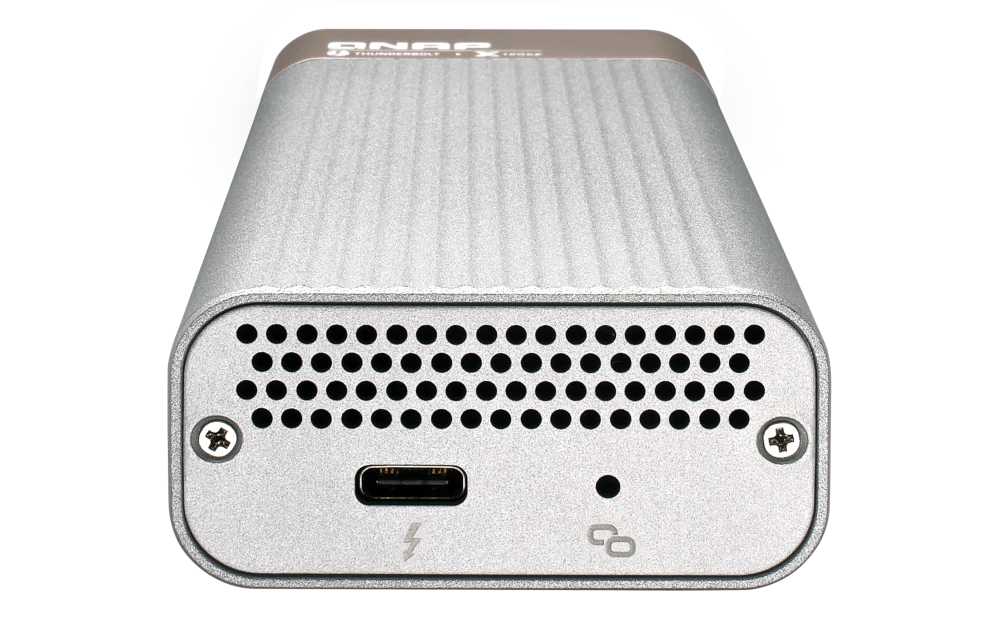
QNAP QNA-T310G1S Connect to 10GbE SFP
10GbE data transfer that media professionals need
As video resolutions move from 1080p, to 4K, 8K (and beyond) media creators are struggling with the storage and network requirements needed for editing huge multimedia files. The QNA-T310G1S features one 10GbE SFP+ port, allowing you to easily add 10GbE connectivity to any Thunderbolt 3 device. Coupled with a QNAP 10GbE switch, a budget-friendly 10GbE environment can be created for creative studios to benefit from the incredible speed and bandwidth that 10GbE provides.

-

Stylish
The QNA series features a metallic bright-toned cover that fits perfectly alongside other devices.
-

Portable
The QNA series requires no extra power supply, and you can easily carry it around for universal deployment.
-

Heat Dissipation
The QNA series has shallow grooves on its top for effective heat dissipation.
Effortless setup
Simply connect a QNA adapter to your Mac or Windows® computer using the included Thunderbolt 3 cable and connect the adapter to a 10GbE-capable switch, NAS, or other device using a 10GbE cable (RJ45 Cat 5e/Cat 6a cable or above or a SFP+ DAC).

How to set the MTU
Mac: Open “System Preferences” → go to “Network” → Select the QNA Thunderbolt Ethernet → click “Advanced…” → go to the “Hardware” tab → change “Configure” to “Manually” → set “MTU” to “9000”.
Windows: Open ‘Settings’ → go to ‘Network & Internet’ → click ‘Change your adapter options’ → right click on the Thunderbolt 3 Ethernet adapter and click ‘Properties’ → click ‘Configure…’ → go to the ‘Advanced’ tab → select ‘Jumbo Frame’ and set the value to ‘9KB MTU’.
NAS: Open ‘Network & Virtual Switch’ → go to ‘Network’ > ‘Interfaces’ → find the applicable Ethernet adapter, click  and select ‘Configure’ → go to the ‘IPv4’ tab → set ‘Jumbo Frame’ to 9000.
People Also Viewed
-
QXP-400eS-A1164
Expand PC and NAS storage with easy installation

-
QXG-10G2SF-X710
Dual-port, 10 GbE network expansion card

-
TL-R1200PES-RP
PCIe Interface 12-bay JBOD, supporting SATA drives, for petabyte-scale expansion designed specifically for QNAP NAS

-
QXP-3X4PES
Use a PCIe Gen 3 x4 card to connect your NAS to TL PCIe Interface JBOD for storage expansion

-
QNA-UC5G1T
Connect to 5GbE networks over USB 3.2 Gen 1

QXP-400eS-A1164
Expand PC and NAS storage with easy installation
QXG-10G2SF-X710
Dual-port, 10 GbE network expansion card
TL-R1200PES-RP
PCIe Interface 12-bay JBOD, supporting SATA drives, for petabyte-scale expansion designed specifically for QNAP NAS
QXP-3X4PES
Use a PCIe Gen 3 x4 card to connect your NAS to TL PCIe Interface JBOD for storage expansion
QNA-UC5G1T
Connect to 5GbE networks over USB 3.2 Gen 1
-
Optical Transceiver 10GbE SFP+ 850nm SR up to 300m industrial-temperature(-40~85°C )
Dimension (L × W × H): 5.98 × 1.40 × 1.20 (cm)
Weight: 0.08 (kg)
-
Mellanox MFM1T02A-SR SFP+ Optical Module for 10GBASE-SR
Dimension (L × W × H): 12.00 × 19.50 × 3.50 (cm)
Weight: 0.10 (kg)
-
SFP+ 10GbE twinaxial direct attach cable, 1.5M
Dimension (L × W × H): 1.00 × 24.00 × 29.50 (cm)
This 10GbE SFP+ network cable is designed for NAS models with an integrated 10GbE SFP+ LAN port or a 10GbE SFP+ network card.
-
SFP+ 10GbE twinaxial direct attach cable, 3.0M
This 10GbE SFP+ network cable is designed for NAS models with an integrated 10GbE SFP+ LAN port or a 10GbE SFP+ network card.
-
SFP+ 10GbE twinaxial direct attach cable, 5.0M
This 10GbE SFP+ network cable is designed for NAS models with an integrated 10GbE SFP+ LAN port or a 10GbE SFP+ network card.
| Network Adapters | Thunderbolt to 10GbE |
| Standard Warranty | 1 year |
| PHY IC | AQC100S |
| I/O | 1 x Thunderbolt 3, 1 x 10GbE SFP+ connector |
| Transmission rates | 10Gbps/1Gbps |
| Operating temperature | 5 – 45 °C (23 – 113°F) |
| Package Contents | QNA-T310G1S, 0.5M Thunderbolt 3 cable and manual. |
| Port and cable | SFP+; SFP+ direct attach cable recommended |
| Note | ● Windows® devices: The driver for the Marvell AQtion AQC100 is required to use the QNA-T310G1S. ● Mac devices: Requires macOS 10.13.3 (or later). ● Linux: Supports Linux core 3.10, 3.12, 3.2, 4.2, and 4.4. The driver for the Marvell AQtion AQC100 is required to use the QNA-T310G1S. ● Ubuntu: 20.04, 22.04 ● QNAP Thunderbolt™ 3 NAS: Requires QTS 4.3.6 (or later). |
Warning: Using unsupported modules may degrade performance, cause errors, or prevent the operating system from starting.
QNAP reserves the right to replace partial parts or accessories if the original is no longer available from its manufacturer/supplier. Any replacement would be fully tested and verified to meet strict compatibility and stability guidelines and will deliver identical performance to the original.
The terms HDMI, HDMI High-Definition Multimedia Interface, HDMI trade dress and the HDMI Logos are trademarks or registered trademarks of HDMI Licensing Administrator, Inc.
Product images are for illustrative purposes only and may differ from the actual product. Due to differences in monitors, colors of products may also appear different to those shown on the site.
Designs and specifications are subject to change without notice.
Reviews
There are no reviews yet.